

TM’s 99-peso weekly surf options are useful when you want open-access data for browsing, classes, work, messaging, light streaming, or backup hotspot use. Names can vary by channel: Surf4All99, Surf for All 99, EasySurf99, or All Surf 99.
Note: TM promo names, GB allocations and registration keywords can change. Confirm the exact offer in GlobeOne or *143# before subscribing.
What is All Surf 99 TM?
All Surf 99 TM is a common label for ₱99, 7-day surf promos. You will usually see two versions:
- Surf4All99: 9GB shareable open-access Group Data.
- EasySurf99: solo EZ99-style data with a smaller open-access bucket plus app-specific freebie data.
| Price | ₱99 |
|---|---|
| Validity | 7 days |
| Surf4All99 data | 9GB open-access data for all apps and websites, shareable through Group Data |
| EasySurf99 data | Usually 2GB to 3GB open-access data plus up to 14GB app freebie data, depending on the current listing |
| Registration | *143#, GlobeOne, and sometimes SMS keyword to 8080 |
| Sharing | Surf4All99 supports Group Data; EasySurf99 is solo |
Surf4All99 TM: Shareable Data
Choose Surf4All99 if you want to share one 9GB open-access data pool with family or friends. It is best for households and small groups that can manage usage.
- Includes 9GB data for all apps and websites, valid for 7 days.
- Can be shared with supported Globe and TM accounts, including Globe Prepaid, Postpaid, Platinum, Home Prepaid WiFi, Globe LTE Mobile WiFi, and TM, subject to current GlobeOne rules.
- Group Data commonly supports up to four mobile numbers in the group, so check the exact member cap shown in GlobeOne.
- GlobeOne is the easiest way to manage members, usage, and per-member data limits.
EasySurf99 TM: Solo Data
Choose EasySurf99 if you want a solo EZ99-style promo instead of a shared pool. It is not the same structure as Surf4All99: EasySurf99 usually combines a smaller open-access allocation, often listed as 2GB to 3GB, with up to 14GB app-specific freebie data depending on the current offer shown in GlobeOne.
Surf4All99 vs EasySurf99
| Feature | Surf4All99 | EasySurf99 |
|---|---|---|
| Promo type | Shareable Group Data | Personal EZ99-style promo |
| Price | ₱99 | ₱99 |
| Validity | 7 days | 7 days |
| Data | 9GB open-access shared data for all apps and websites | Smaller open-access bucket, usually 2GB to 3GB, plus up to 14GB app-specific freebie data |
| Best for | Family, barkada, shared backup internet, or WiFi-device sharing | Solo users who can maximize daily app freebies |
| Main drawback | Shared pool needs usage controls | No sharing; freebie data is app-specific |
How to Register for All Surf 99 TM
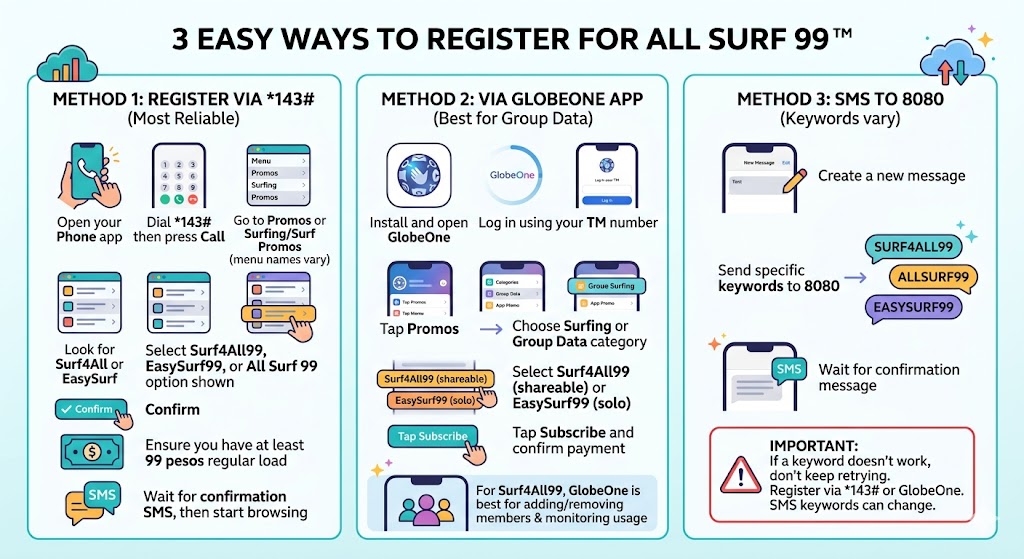
Option 1: *143#
- Dial *143#.
- Go to Promos, Surfing, or Surf Promos.
- Look for Surf4All99, EasySurf99, or All Surf 99.
- Confirm and wait for the SMS notice.
Option 2: GlobeOne
- Open GlobeOne and log in with your TM number.
- Tap Promos.
- Choose Surfing or Group Data.
- Select Surf4All99 or EasySurf99.
- Subscribe and confirm payment.
Option 3: SMS to 8080
Some accounts may support keywords such as SURF4ALL99, ALLSURF99, or EASYSURF99 to 8080. If a keyword fails, use *143# or GlobeOne instead.
How to Set Up Surf4All99 Data Sharing
- Open GlobeOne.
- Go to Group Data.
- Create or open your group.
- Tap Add Member.
- Enter a supported Globe or TM number and confirm.
- Use Settings or Manage Data Limit in GlobeOne to assign a limit, such as 1GB or 3GB, for each member if the option appears.
Surf4All99 commonly supports sharing with up to four mobile numbers in the group, depending on the current rules in GlobeOne. If data drains fast, set per-member limits first, then remove heavy users temporarily, turn off autoplay, and avoid HD streaming on shared data.
How to Extend, Renew, or Stop All Surf 99 TM
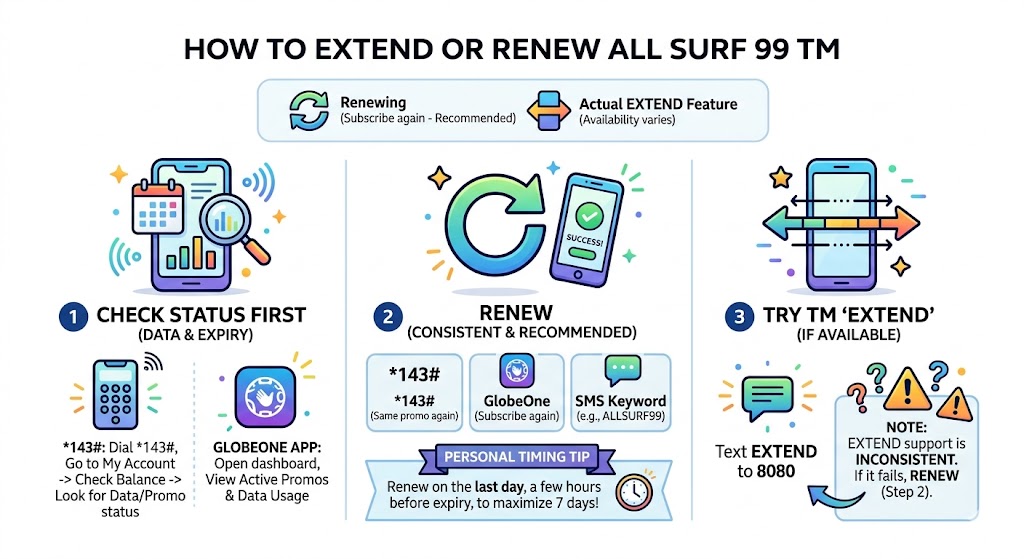
Most users renew by subscribing again near expiry or after the promo ends. An EXTEND feature may appear for some accounts, but availability varies.
- Renew via *143# by selecting the same promo again.
- Renew via GlobeOne by subscribing again.
- Try EXTEND to 8080 only if it is supported on your account.
- To stop Surf4All99, text STOP SURF4ALL99 to 8080 and wait for the confirmation message.
How to Check Remaining Data
| Method | What to do | Best for |
|---|---|---|
| *143# | Dial *143# and check account/promo balance | Basic phones |
| GlobeOne | Open dashboard, Active Promos, or Group Data | Group Data management |
| SMS alerts | Watch for expiry or low-data reminders | Backup reminders |
Troubleshooting
| Issue | Likely reason | Fix |
|---|---|---|
| No confirmation SMS | Delayed SMS | Wait 5–10 minutes, restart, check active promos. |
| Promo will not register | Not enough regular load | Load at least ₱99 and retry. |
| Keyword not working | Keyword changed or unsupported | Use *143# or GlobeOne. |
| Cannot add member | Number or device is not eligible for Group Data | Confirm the number format and check GlobeOne. Supported accounts may include Globe Prepaid, Postpaid, Platinum, Home Prepaid WiFi, Globe LTE Mobile WiFi, and TM. |
| Data drains fast | Video autoplay, hotspot usage, or one member using too much data | Set per-member limits in GlobeOne, then use data saver and lower streaming quality. |
FAQs
How can I register for All Surf 99 TM?
Use *143#, GlobeOne, or an active SMS keyword to 8080.
How long is the validity?
These promos are typically valid for 7 days from activation.
How much data is Surf4All99?
Surf4All99 provides 9GB shareable open-access data for all apps and websites, valid for 7 days.
Which should I choose?
Choose Surf4All99 for 9GB shared open-access data. Choose EasySurf99 if you are a solo user and can maximize app-specific freebie data.