

If you're on TM and you just need a cheap 2-day promo that covers the basics, TM ALL-NET SURF 20 (officially listed as ALL-NET SURF 20 on TM Tambayan, with older aliases AN20, AllNet20, and the original A20) is one of the easiest "load, register, and go" options. The registration keywords have evolved over time — ANS20 is the current preferred keyword, though the older AN20 and A20 still work. I've helped a lot of students and budget-conscious users activate this promo (usually when they're rushing before class or commuting), and the biggest reason people keep coming back to AN20 is simple: it's affordable, and it bundles data plus all-network communication in one click.
In this guide, I'll tell you all you need to know about the AN20 promo.
Important note: Current references point to AN20 as a 2-day promo with fixed inclusions, but you should still confirm the final expiry time and allocation in your activation message or active promos screen.
Quick Summary: What You Get With TM AN20
TM AN20 (AllNet20) at a glance
| Item | Details |
|---|---|
| Promo name | ALL-NET SURF 20 (also listed as AN20, ANS20, AllNet20; older alias: A20) |
| Network | TM (Touch Mobile) under Globe |
| Price | 20 pesos |
| Validity | 2 days |
| Data | 300 MB open-access data + 150 MB/day for FunALIW apps (about 600 MB total over 2 days) |
| Texts | Unlimited texts to all networks |
| Calls | Unlimited calls to all networks |
| Registration keyword | ANS20 (current); AN20 and A20 also accepted |
| Register via | SMS, *143#, GlobeOne app, or GCash |
| Best for | Budget 2-day use: chat, light browsing, quick calls/texts |
Real talk: If you're a heavy user (streaming, mobile gaming updates, hotspot all day), AN20 will feel bitin (not enough). In that case, look at TM EZ50 or TM EZ70 instead. But if you want a budget daily lifeline, it's one of the most practical options.
What Is TM AN20 (AllNet20)?
TM ALL-NET SURF 20 is a prepaid combo promo designed for everyday connectivity. Instead of registering separate promos for data, texts, and calls, it combines all three for ₱20 with a 2-day validity.
The name has evolved over time: it started as All-In 20 (A20), then became All-Net 20 (AN20), and is currently listed on TM Tambayan as ALL-NET SURF 20 (ANS20). All three registration keywords (ANS20, AN20, A20) are still accepted when sending to 8080.
In real-life use, this is what most people use AN20 for:
- Messaging (Messenger, Viber, Telegram, etc.)
- Light social scrolling
- Quick Google searches and maps
- Short calls to family, classmates, or clients
- Backup internet when Wi‑Fi is slow or unavailable
TM AN20 Inclusions: What You Usually Get (And Why It Sometimes Looks Different)
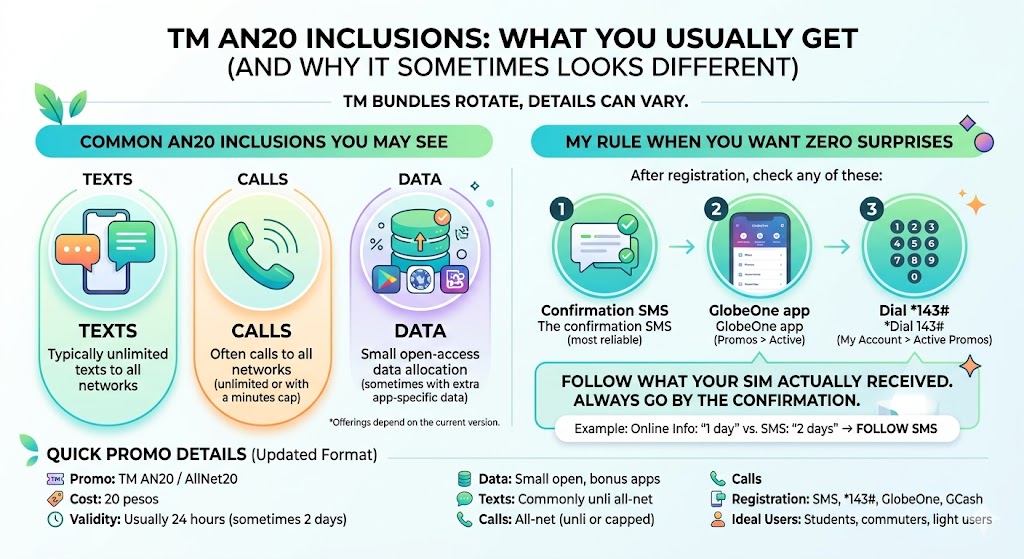
The current AN20 version is more clearly defined than older listings, so you can usually expect the same core inclusions across TM's main registration channels.
Common AN20 inclusions you may see
- Texts: Unlimited texts to all networks
- Calls: Unlimited calls to all networks
- Data: 300 MB open-access data plus 150 MB per day for FunALIW apps such as TikTok, Facebook, YouTube, Mobile Legends, iWantTFC, Call of Duty, and Vivamax
TM AN20 Promo Details Table
| Item | Details |
|---|---|
| Promo | TM AN20 / AllNet20 |
| Cost | 20 pesos |
| Validity | 2 days |
| Data | 300 MB open-access data + 150 MB/day for FunALIW apps (TikTok, Facebook, YouTube, Mobile Legends, iWantTFC, Call of Duty, and Vivamax) |
| Texts | Unlimited texts to all networks |
| Calls | Unlimited calls to all networks |
| Registration options | SMS (ANS20 / AN20 / A20 to 8080), *143#, GlobeOne app, and GCash Buy Load |
| Ideal users | Students, commuters, light data users, people who need all-network texts/calls daily |
My rule when you want zero surprises: Treat 2 days as the current standard, then verify the exact expiry time in your confirmation SMS, GlobeOne app (Promos > Active), or *143# active promos menu. Always follow what your SIM actually received.
How to Register TM AN20 (AllNet20)
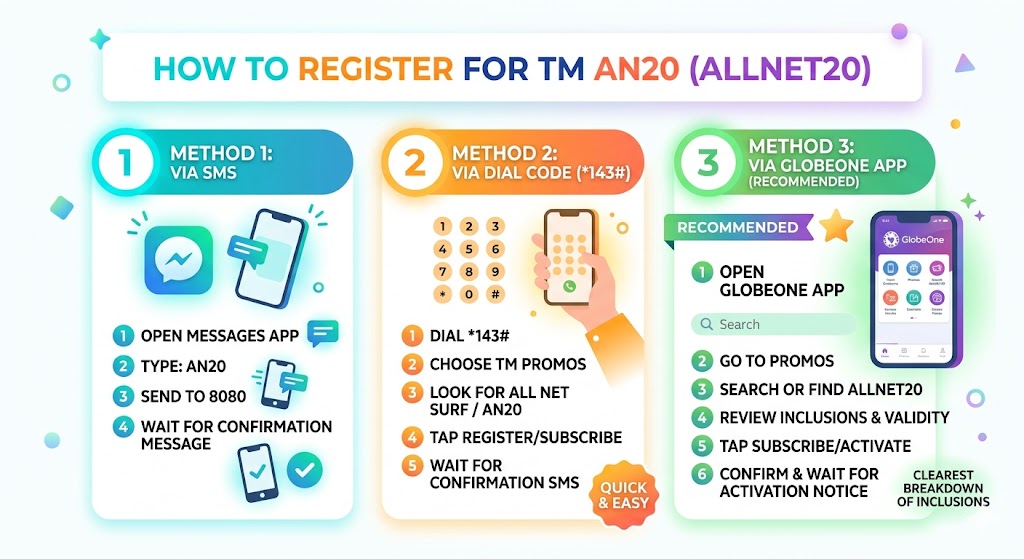
You have four practical ways. I recommend starting with the GlobeOne app if available because it shows the exact inclusions before you confirm. But SMS, *143#, and GCash also work well.
Before you register — quick checklist:
- Your TM SIM must be active.
- You need at least 20 pesos load (keep a little extra just in case of delayed charging issues).
- Ensure your SIM is properly registered (PH SIM Registration compliance), because some services may be restricted on unregistered SIMs.
- You cannot re-register while AN20 is still active. You must wait for it to expire or send AN20 STOP to 8080 to unsubscribe first.
- AN20 cannot be extended. Once registered, there is no way to add more days — the only option is to let it expire and register again.
Method 1: Register via SMS
- Open your Messages app.
- Type: AN20, A20, or ANS20
- Send to 8080.
- Wait for the confirmation message.
Method 2: Register via Dial Code (*143#)
- Dial *143#
- Choose TM Promos.
- Look for All Net Surf / AllNet20 / AN20.
- Tap Register/Subscribe.
- Wait for the confirmation SMS.
This is the method I use most often when someone asks me to help.
Method 3: Register via GlobeOne App (Recommended)
- Open GlobeOne.
- Go to Promos.
- Search or find AllNet20 / AN20.
- Review inclusions and validity.
- Tap Subscribe/Activate.
- Confirm and wait for the activation notice.
Method 4: Register via GCash
- Open GCash.
- Go to Buy Load.
- Enter your TM number.
- Open the Call & Text tab and look for ALLNET20.
- Tap the promo and complete payment.
Tip: GlobeOne usually displays the clearest breakdown of what you're actually getting right now, while GCash is useful if you already keep funds there.
How to Check If AN20 Is Active (And Track Remaining Data)
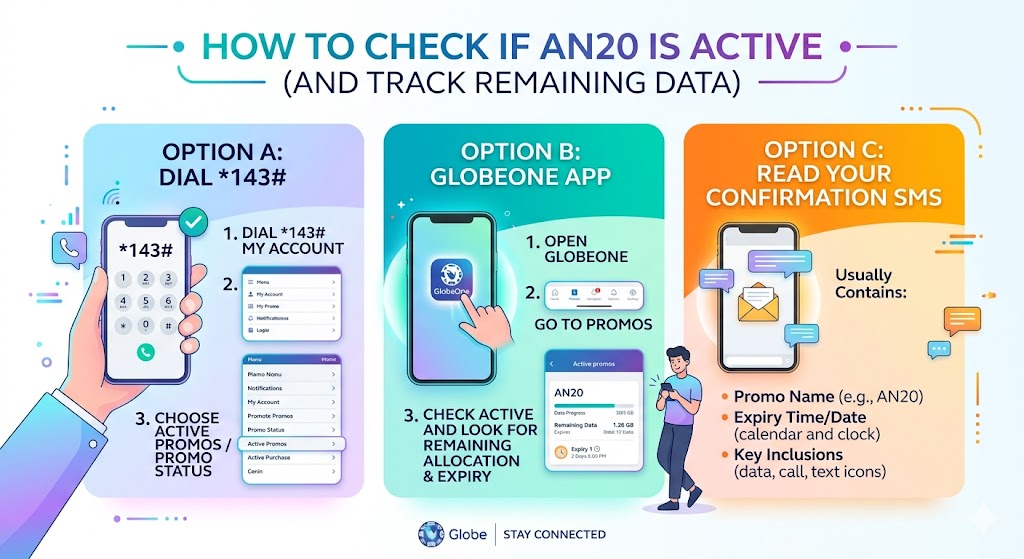
Option A: Dial *143#
- Dial *143#
- Go to My Account.
- Choose Active Promos / Promo Status.
Option B: GlobeOne App
- Open GlobeOne.
- Go to Promos.
- Check Active and look for the remaining allocation and expiry.
Option C: Check via SMS
- Open your Messages app.
- Type AN20 STATUS.
- Send it to 8080.
- Wait for TM's reply with your active promo status or remaining balance.
Option D: Read Your Confirmation SMS
It usually contains:
- Promo name
- Expiry time/date
- Key inclusions
How to Maximize TM AN20 (Practical Tips I Personally Use)
AN20 is budget-friendly by design, so the goal is to avoid silent data drain and make the most of its 2-day allocation.
- Use it for chat and essentials first. Messenger, email, and quick browsing.
- Save your FunALIW allowance for supported apps. Use TikTok, Facebook, YouTube, Mobile Legends, iWantTFC, Call of Duty, and Vivamax from the daily 150 MB app bucket before touching your open-access MB.
- Avoid auto-play and HD streaming. TikTok/YouTube can finish small data fast.
- Turn off background data for heavy apps. Facebook, TikTok, Google Photos, Play Store/App Store.
- Disable auto-updates. Update when you're on Wi‑Fi instead.
- Check your expiry. If your usage pattern is daily, set a reminder so you don't get charged by regular rates after expiry.
Helpful Table: Approximate Data Usage (So You Can Budget Your MB)
These are realistic estimates per 10 minutes of use, but they help you plan. Note: actual usage varies by network quality, app version, and video resolution.
| Activity | Approx. Data per 10 Minutes |
|---|---|
| Facebook scrolling (mostly text/images) | 5 to 15 MB |
| Messenger chat (text) | under 1 MB |
| Messenger voice call | 3 to 10 MB |
| Video call (low quality) | 40 to 90 MB |
| YouTube (low quality) | 30 to 80 MB |
| TikTok/Reels (auto-play) | 60 to 150 MB |
| Google Maps navigation | 3 to 10 MB |
Bottom line: AN20 gives you 300 MB open data plus 150 MB/day for FunALIW apps, so you'll get the best value by saving the open-access data for tasks that are not covered by the app bucket.
Troubleshooting: Common AN20 Problems and Fixes
1) Registration failed
Likely reason: Not enough load.
Fix: Reload, then retry.
2) No confirmation SMS
Likely reason: Network delay or inbox issues.
Fix: Wait 5 to 10 minutes, restart phone, retry once.
3) Promo not showing in Active Promos
Likely reason: App sync delay.
Fix: Check via *143# and confirmation SMS.
4) Charged but promo not active
Likely reason: System delay.
Fix: Wait a few minutes; if still not active, document time/date and contact support.
5) Cannot register while another promo is active
Likely reason: Promo conflict.
Fix: Let current promo expire or register a compatible add-on.
How to stop or unsubscribe from AN20
- Open your Messages app.
- Type AN20 STOP.
- Send it to 8080.
- Wait for the unsubscribe confirmation before registering a replacement promo.
Best Alternatives If AN20 Feels Too Short
AN20 cannot be extended — there is no keyword or method to add more days to an active subscription. Once it expires, you register again. If you keep re-registering every 2 days, you might save time (and sometimes money) by moving up to a longer-validity promo when available on your SIM.
| Alternative | Best for | Why consider it |
|---|---|---|
| AN30 or similar | Longer daily coverage | Usually more data or longer validity than AN20 |
| Higher data bundles (weekly) | Streaming and heavy browsing | Less stress about MB |
| Call/text-only promos | Data not needed | Cheapest way to stay reachable |
| Combo promos 3 to 7 days | Work or school weeks | Fewer registrations, more consistent usage |
Best move: Open GlobeOne and compare what's currently offered on your exact TM number, because available promos can differ per subscriber.
Frequently Asked Questions
What does AN20 TM include?
AN20 currently includes unlimited texts to all networks, unlimited calls to all networks, 300 MB open-access data, and 150 MB per day for FunALIW apps over its 2-day validity.
How do I register AllNet20 / AN20 TM?
You can register using any of these: SMS (send AN20, A20, or ANS20 to 8080), Dial code (*143# then TM Promos then AllNet20/AN20), the GlobeOne app, or GCash Buy Load if ALLNET20 is available for your number.
How long is AN20 valid?
The current AN20 promo is valid for 2 days. Always follow the exact expiry time shown in your confirmation SMS or active promos screen.
Can I call and text all networks with AN20 TM?
Yes. The current AN20 offer includes unlimited texts and unlimited calls to all networks during its 2-day validity.
Is there a maintaining balance requirement for AN20?
There's usually no maintaining balance beyond having enough load to register. The main requirement is that you have at least 20 pesos (and your SIM is active).
What if my registration fails or I don't get confirmation?
Wait a few minutes, check *143# Active Promos, then retry once. If you were charged but did not receive the promo, save screenshots/time and use GlobeOne's help/support options through TM Customer Service.
How do I check or stop AN20 by text?
To check your status, text AN20 STATUS to 8080. To unsubscribe, text AN20 STOP to 8080 and wait for the confirmation message.
Conclusion: Is TM AN20 Worth It?
If you want a simple, cheap 2-day promo that helps you stay reachable on any network while still having data for essentials, TM AN20 (AllNet20) is a good choice. It's especially useful if you're the type of user who just needs chat, quick calls, and light browsing without committing to a bigger weekly promo.