

If your TM data is slow, says connected with no internet, or keeps dropping, check your APN first. Most phones set the Globe/TM APN automatically, so manual setup is mainly for cases where mobile data, hotspot, or network routing is not working properly.
What is an APN and Why It Matters
APN means Access Point Name. It tells your phone how to connect to TM and Globe’s mobile data gateway.
- Correct APN: stable 4G LTE/5G data, app access, hotspot/tethering, and assisted GPS services.
- Wrong APN: connected but no internet, slow browsing, hotspot problems, disconnections, or some apps failing.
Reality check: APN settings cannot override weak signal or tower congestion, but they can remove configuration problems.
Before You Change Anything
- Restart your phone.
- Confirm your TM SIM is the selected mobile data SIM.
- Turn mobile data on.
- Toggle airplane mode for 10 seconds.
- Check that your promo or data allocation is active.
- For 5G, confirm your phone and area support 5G.
TM APN Settings for Android
Android setup steps
- Open Settings.
- Tap Network and Internet, Connections, or Mobile Network.
- Open SIMs or Mobile Network.
- Tap Access Point Names.
- Tap Add or the plus icon.
- Enter the values below, save, select the APN, and restart.
| Name | TM Internet |
|---|---|
| APN | internet.globe.com.ph |
| Proxy / Port | Not set |
| Username / Password | Not set |
| MCC | 515 |
| MNC | 02 |
| Authentication Type | Not set |
| APN Type | default,supl |
| APN Protocol | IPv4, or IPv4/IPv6 if stable |
| Bearer | Unspecified or LTE |
TM APN Settings for iPhone
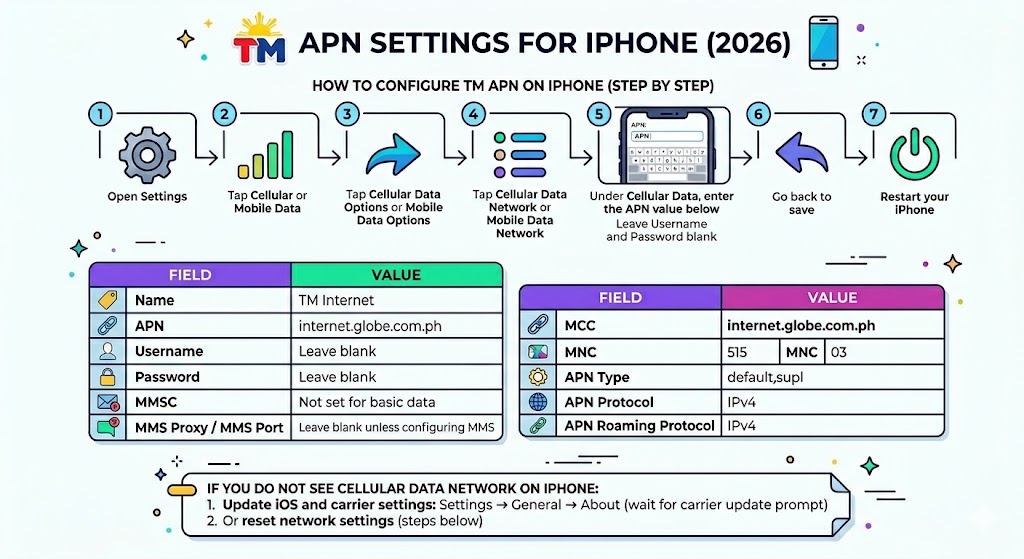
- Open Settings.
- Tap Cellular or Mobile Data.
- Tap Cellular Data Options or Mobile Data Options.
- Tap Cellular Data Network or Mobile Data Network if available.
- Under Cellular Data, enter internet.globe.com.ph.
- Leave username and password blank.
- Go back to save, then restart.
Before forcing a manual APN, also check for iOS and carrier settings updates. If the Cellular Data Network menu is hidden, update iOS/carrier settings or reset network settings.
How to Reset TM APN Settings
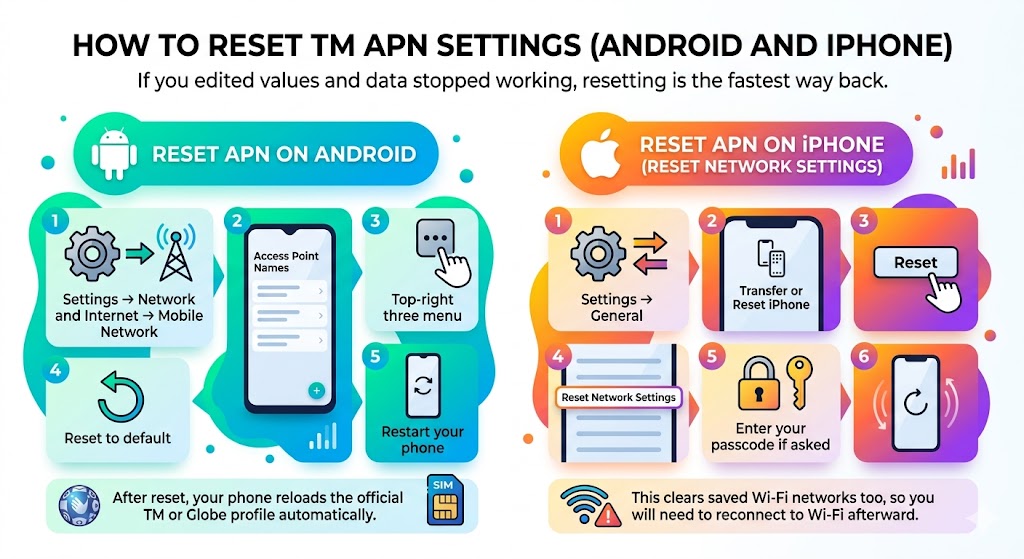
Android
- Go to Access Point Names.
- Tap the three-dot menu.
- Tap Reset to default.
- Restart your phone.
iPhone
- Open Settings > General.
- Tap Transfer or Reset iPhone.
- Tap Reset.
- Tap Reset Network Settings.
Best TM APN for Fast Internet
For most users, the fastest safe APN is still the official clean profile: internet.globe.com.ph, no proxy, no port, no random APN apps. If it does not work well in your area, you can also test fast.globe.com.ph as an alternate APN and keep whichever is more stable.
- Do not change MCC/MNC unless you know why.
- Avoid third-party APN setter apps that add duplicate profiles.
- Try IPv4/IPv6 only if your phone supports it and data remains stable.
- MMS uses a separate APN profile, commonly mms.globe.com.ph, with its own MMSC, MMS proxy, and port values.
TM APN for Gaming
Start with the default APN. Some older “gaming APN” tips mention http.globe.com.ph with proxy 203.177.42.214 and port 8080, but this site does not recommend proxy-based APNs as a first choice because they can slow browsing, break app logins, or make troubleshooting harder.
| Safer gaming tweak | Why it helps |
|---|---|
| Use LTE-only or stable 5G-only mode | Reduces band switching and jitter. |
| Play near a window | Improves signal quality. |
| Turn off VPN | VPN often increases ping. |
| Close background apps | Reduces packet loss and congestion. |
TM APN Troubleshooting
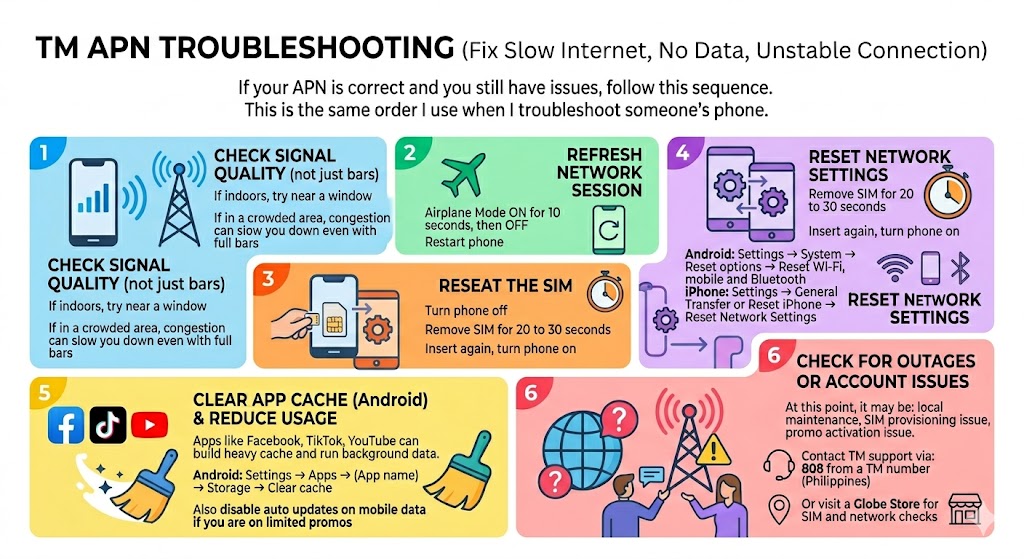
| Issue | Fix |
|---|---|
| Connected but no internet | Select the TM Internet APN, toggle airplane mode, restart. |
| Slow internet after APN setup | Check signal, promo status, tower congestion, and background downloads. |
| Hotspot not working | Reset APN to default, then use internet.globe.com.ph with no proxy or port. |
| No APN edit menu on iPhone | Update carrier settings or reset network settings. |
| Data broke after custom APN | Reset APN to default and use internet.globe.com.ph. |
FAQs
What is the best APN for TM?
internet.globe.com.ph is the safest recommended TM APN for most users.
Is it safe to use APN apps?
Manual setup is safer. APN apps often add duplicate profiles or proxy values that make troubleshooting harder.