

If you're on TM and something suddenly goes wrong — like your load didn't reflect, your promo won't register, your data is crawling, or your SIM got lost — you don't need to guess what to do next. TM support (under Globe Telecom) gives you several official ways to get help: hotline, chat, and in-store assistance.
I've personally dealt with the usual TM issues over the years: promo registration errors, missing load, SIM replacement, and even roaming activation questions. The quickest solutions involve two steps — contacting the right channel and gathering the necessary information before making contact. In this guide, I'll walk you through every updated TM customer service method and how to reach them.
Note: Hotline numbers and menu options can change. The GlobeOne app and the official Globe website are your most accurate sources to verify current information.
1. How to Contact TM Customer Service (All Official Options)
The TM hotline operates around the clock, seven days a week. Actual wait times depend on demand.
Contact Options at a Glance
| Support Option | Best For | Availability | What You'll Need |
|---|---|---|---|
| TM Hotline (from TM SIM) | Urgent concerns, account verification, SIM issues, missing load, promo problems | 24/7 | Your TM number, recent transactions, ID details for verification |
| Hotline via landline or other networks | When you can't call using your TM SIM | 24/7 (hotlines), varies | TM number, details of your concern |
| Chat support (Gie virtual assistant / live agent) | Promo registration issues, troubleshooting, follow-ups, non-urgent concerns | 24/7 for chatbot; live agent availability may vary | TM number, screenshots if needed |
| Globe / TM Store (service center) | SIM replacement, SIM swap, device checks, account ownership concerns | Store hours | Valid ID, affidavit of loss (if applicable), proof of ownership |
| GlobeOne app (Help section) | Fast self-service: track promos, check usage, raise concerns | 24/7 | GlobeOne login access |
| Facebook Messenger (@globe or @TM Tambayan) | @globe for broader Globe/TM account support; @TM Tambayan for TM-specific updates and promo questions | 24/7 for bot; live agent hours may vary | TM number, details of your concern |
| Email support | Formal complaints, documentation-heavy concerns, follow-ups | Response within 24–48 hours (typical) | TM number, full concern details, reference numbers |
If your concern involves SIM Registration, mention it directly in chat or on the hotline and have your registered name and details ready. SIM-related verification usually requires additional checks.
2. TM Customer Service Hotline Numbers (Updated 2026)
Here are all the official TM and Globe support numbers. Note that phone support is now primarily self-service (automated menus). For live agent help, chat channels (GlobeOne, Messenger, website) are more reliable.
Official TM Hotline Numbers
| Who Is Calling | Number to Dial | Notes |
|---|---|---|
| TM users calling from their TM SIM | 808 | Connects you to TM's self-service voice menu. Usually free when dialing from a TM SIM. |
| Globe/TM users (unified number) | 211 | Globe’s unified support line — works from any Globe or TM mobile number. Not TM-exclusive; routes to the same Globe support system. |
| Landline or non-TM mobile users (TM-specific) | (02) 7730-1500 | TM-dedicated support line. Use this number to reach the TM service menu directly. |
| Landline or non-TM mobile users (general Globe) | (02) 7730-1000 | Globe's general consumer service line. Also routes to TM support, but starts in the Globe menu. |
Example: "My load worth ₱100 didn't reflect after GCash payment at 3:14 PM, reference number is X."
3. Is the TM Hotline Available 24/7?
Yes, TM hotline support is designed to be available 24 hours a day, 7 days a week, including holidays. That said, real-world wait times can still vary depending on demand.
When You Usually Get a Faster Response
This varies, but based on common telecom support patterns:
- Off-peak hours often mean shorter queues
- Payday weekends, major sale days, and post-promo-launch periods tend to be busier
If you can't wait on hold, switch to chat support so you can continue doing other things while waiting for a response.
4. How to Call the TM Hotline (Step-by-Step)
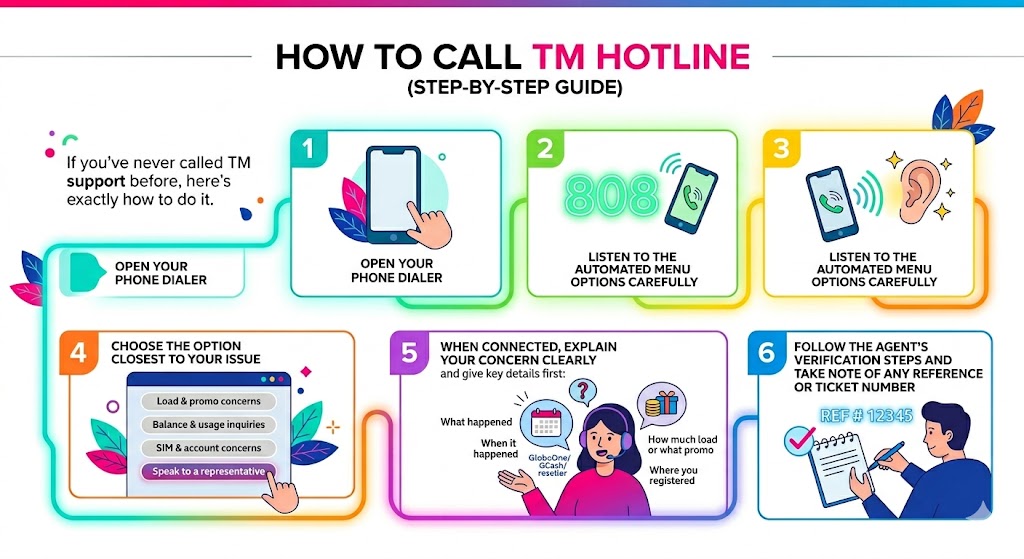
If you've never called TM support before, here's exactly how to do it.
- Open your phone dialer.
- Dial 808 using your TM number.
- Listen to the automated menu options carefully.
- Choose the option closest to your issue, such as:
- Load and promo concerns
- Balance and usage inquiries
- SIM and account concerns
- Self-service options (most common issues can be resolved here)
- Follow the automated prompts. Many issues (balance checks, promo status, basic troubleshooting) can be resolved through the self-service menu without waiting for a person.
- If you're not redirected to a live agent and still need further help, note any reference number provided and switch to chat support (GlobeOne, Messenger, or the Globe website) where live agents are more readily available.
⚠️ Important: Globe transitioned most live agent support away from phone hotlines starting in 2020. The 808 and landline numbers now primarily offer self-service automated menus. If you need to speak with a real person, your best options are Facebook Messenger (@globe for broader Globe/TM support, or @TM Tambayan for TM-specific updates), GlobeOne app chat, or the official Globe website chat — where you can request a live agent after starting with Gie.
5. TM Customer Service Chat Support (Website & GlobeOne)
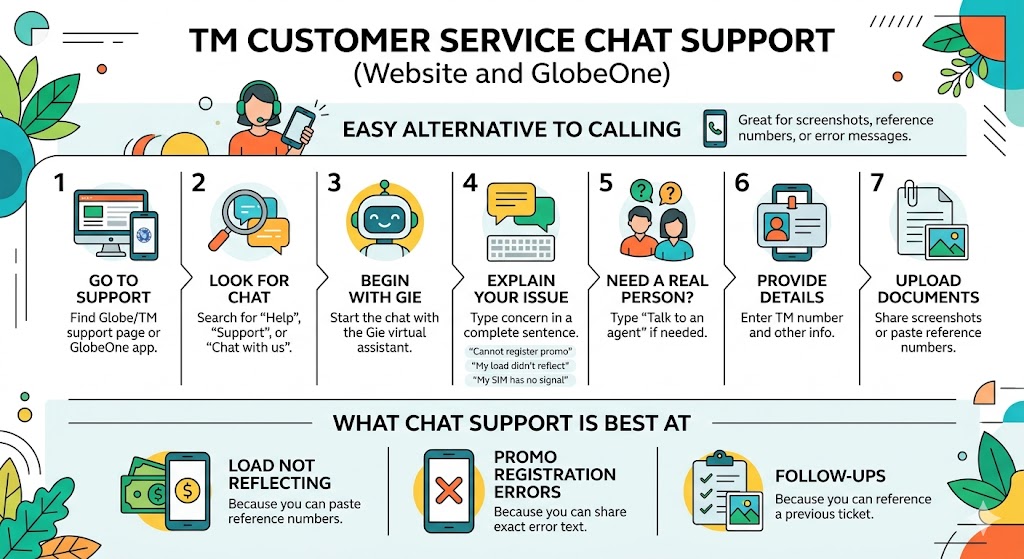
If you prefer not to call, chat is one of the easiest ways to get help — especially if you have screenshots, reference numbers, or error messages to share.
TM and Globe use "Gie" as the virtual assistant on official platforms, and you can request a live agent when needed.
How to Use TM Chat Support (Step-by-Step)
- Go to the official Globe or TM support page, or open the GlobeOne app.
- Look for Help, Support, or Chat with us.
- Start the chat with Gie (virtual assistant).
- Type your concern in a complete sentence, for example:
- "I cannot register to a promo, it says insufficient balance but I have load"
- "My GCash load did not reflect"
- "My SIM has no signal"
- If the chatbot answers but you still need a real person, type: "Talk to an agent"
- Provide your TM number and any requested details.
- If asked, upload screenshots or paste reference numbers.
Facebook Messenger Support
One of the most widely used ways to get TM/Globe support is through Facebook Messenger. Use @globe for broader account support and live-agent routing, or @TM Tambayan for TM-specific updates and promo questions.
- Open Facebook Messenger and search for Globe for general Globe/TM account support, or TM Tambayan for TM-specific updates.
- Send a message describing your concern — for example: "My TM load didn't reflect, reference number is X."
- You'll start with a chatbot, but you can type "Talk to agent" or "Live agent" to request a real person.
- Messenger support is available 24/7 for the chatbot; live agent availability may vary but is generally more accessible than phone support.
Direct link for broader Globe/TM support: m.me/globe
Email Support
For formal complaints or documentation-heavy concerns, you can also email Globe/TM support. Responses typically arrive within 24–48 hours. Include your TM number, a clear description of the issue, and any reference numbers or screenshots.
What Chat Support Is Best At
Here's what works best in chat (GlobeOne, website, or Messenger):
- Load not reflecting — you can paste reference numbers
- Promo registration errors — you can share the exact error text
- Follow-ups — you can reference a previous ticket number
- Getting a live agent — chat and Messenger are now the primary channels for live human support, since phone hotlines are mostly self-service
6. TM Service Center Locations (Globe Stores)
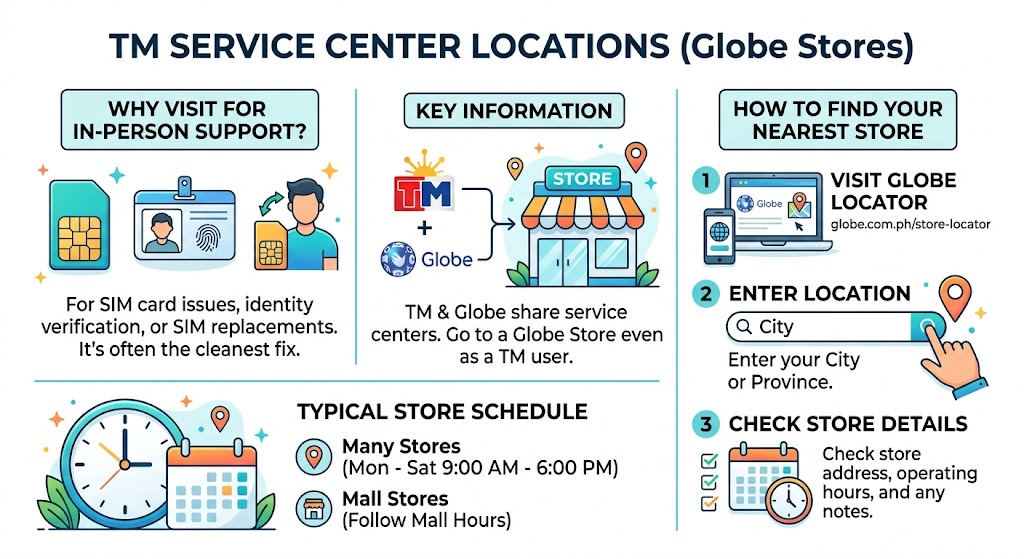
If your issue involves your physical SIM, identity verification, or a SIM replacement, in-person support is often the cleanest fix.
TM and Globe share service centers, so you can visit a Globe Store even if you're a TM user.
How to Find the Nearest TM or Globe Service Center
- Visit the official Globe Store Locator: globe.com.ph/store-locator
- Enter your city or province.
- Check the store address, operating hours, and any notes.
Typical store schedule:
- Many stores operate Monday to Saturday, often around 9:00 AM to 6:00 PM
- Stores inside malls usually follow mall hours
What to Bring to the TM or Globe Store (So You Don't Waste the Trip)
| Concern | What to Bring | Notes |
|---|---|---|
| SIM replacement | Valid government ID, TM number, old SIM (if available) | Some cases require additional verification |
| SIM lost, stolen, or phone lost | Valid ID, proof of ownership, affidavit of loss (if requested) | Requirements can vary depending on the case |
| Wrong registration details or account ownership | Valid ID, supporting documents | Expect strict verification for security |
| Billing or transaction disputes | Receipts, reference numbers, screenshots | Helps speed up the investigation |
If your SIM is lost and you're worried about account security, don't wait. The earlier you report it, the easier it is to secure access and reduce risk.
7. How to Contact Globe At Home Customer Service (Internet Concerns)
If you're using Globe At Home (fiber or prepaid WiFi), the support channels are similar but routed to home internet teams.
Globe At Home Hotline
| Service | Number | Availability | Best For |
|---|---|---|---|
| Globe At Home customer service | (02) 7730-1000 | Self-service menu available 24/7; live support may be limited to 7 AM – 10 PM daily. Verify current hours via GlobeOne. | Connection issues, installation requests, account concerns |
You can also use chat support via the Globe website or GlobeOne app and type your concern — such as "no internet," "slow connection," "LOS blinking red," or "payment posting."
Tip: Prepare your account number or the registered mobile number linked to your Globe At Home service before contacting support.
8. Globe Landline Support & Store Appointment Booking
If you don't have load, a landline call is still one of the most reliable ways to reach support. It's also helpful when you need a stable connection for verification.
Why Booking an Appointment Helps
If you've ever gone to a store and waited forever, you already know why appointments matter. Globe's online appointment system (when available in your area) lets you:
- Choose a store
- Pick a date and time
- Specify your concern
This usually reduces waiting time and improves the chance that the right team is ready for your case.
9. Troubleshooting Before You Contact TM Support (Save Time)
Sometimes you can fix the issue yourself in under 5 minutes. Here's a quick checklist to try before calling or chatting.
Quick-Fix Checklist
| Issue | Try This First | Why It Helps |
|---|---|---|
| No signal or can't text/call | Restart phone, toggle airplane mode, reinsert SIM | Refreshes the network connection |
| Mobile data not working | Check if data is ON, check APN, set network to LTE or 5G auto | Wrong settings are common after updates |
| Promo won't register | Confirm load balance, check if another promo is active, try GlobeOne | Some promos don't stack |
| Load not reflected | Wait 5–15 minutes, confirm reference number, check for SMS confirmation | Posting is sometimes delayed |
| Slow data | Check if you've hit the promo data cap, switch locations, turn off VPN | Network congestion and data caps are common causes |
10. What to Prepare Before Calling or Chatting
This is one of the biggest reasons people experience delays. If you prepare these details, you'll move faster through verification and troubleshooting.
Quick "Ready to Contact Support" List
- Your TM mobile number
- Exact issue and time it happened
- Promo name or keyword (if promo-related)
- Amount loaded and channel used (GCash, GlobeOne, store, reseller)
- Reference number or transaction ID (very important for missing load)
- Screenshot of error message (for chat)
- Previous ticket number (if following up)
11. Official Safety Reminder: Avoid Fake TM Support Accounts
This happens a lot: people search "TM hotline" on social media and end up messaging fake accounts.
How to Protect Yourself
- Do not share OTPs, PINs, or banking passwords
- Do not click suspicious links sent by "support"
- Stick to official channels — GlobeOne app, official website chat, or the hotline numbers listed above
- If someone asks for sensitive information, stop and verify through official channels
12. Frequently Asked Questions
Can I contact TM customer service through chat?
Yes. You can chat through the official Globe website, the GlobeOne app Help section, or Facebook Messenger (@globe for broader Globe/TM support, or @TM Tambayan for TM-specific updates). You'll start with the Gie virtual assistant, and you can request a live agent. Chat and Messenger are now the primary channels for live human support, since phone hotlines are mostly self-service.
How do I find the nearest TM or Globe service center?
Use the Globe Store Locator: globe.com.ph/store-locator. Enter your city or province to view nearby stores, addresses, and hours.
Does TM have a toll-free hotline?
Dialing 808 from a TM SIM is generally free according to Globe's official site. However, if you have no load at all or are calling from a non-TM number, use chat support instead — GlobeOne, Messenger (@globe or @TM Tambayan), or the official Globe website work over Wi-Fi at no cost.
Conclusion
TM gives you several official ways to get help. The 808 hotline (free from TM SIM) and (02) 7730-1500 landline offer self-service automated support for common issues. For live human assistance, Facebook Messenger (@globe for broader Globe/TM support, or @TM Tambayan for TM-specific updates), GlobeOne app chat, and the official Globe website chat are now the primary channels — just type "Talk to agent" after starting with Gie.
For issues that involve SIM replacement or identity verification, visiting a Globe Store is the most reliable solution.