

If you're on TM and you want a weekly promo that feels "balanced" (not just data, not just texts), TM EZ70 is one of the easiest sulit choices in 2026. It's part of TM's EasySURF lineup, built for people who need daily data for a specific app category plus open access for everything else.
I write and maintain telco promo guides like this because the real challenge isn't the price. It's knowing exactly what you're getting, how the daily data works, which app bundle fits your routine, and what to text when something doesn't activate.
Important note: Promo inclusions and app lists can change anytime depending on TM. Always confirm inside the GlobeOne app (formerly TM App), *143#, or official TM channels before registering.
TM EZ70 Promo Quick Details (Updated 2026)
TM EZ70 is commonly displayed as EasySURF70 / EZ70 depending on where you register (SMS vs menu).
What you get for ₱70
| Inclusion | Amount | Validity |
|---|---|---|
| Open-access data | 1 GB (any site/app) | 7 days |
| App bundle data | 1 GB per day (choose one bundle) | 7 days |
| GoWiFi | 1 GB | 7 days (typically) |
| Texts | Unlimited texts to all networks | 7 days |
Total data: how it adds up
| Component | Total |
|---|---|
| Open access | 1 GB |
| Daily app bundle | 7 GB total (1 GB/day × 7 days)* |
| GoWiFi | 1 GB |
| Estimated total | Up to 9 GB |
* Important: Daily app-bundle data (1 GB/day) resets each day and does not roll over. If you don't use your 1 GB bundle on a given day, it's gone.
Note on the "18 GB" claim you may see: Some listings label EZ70 as "18 GB" because of changing bundle structures, promo stacking, or time-limited variants shown in specific menus/accounts. The most consistent base inclusion many TM users see is the up to 9 GB total structure above. Always confirm your exact inclusions after activation using the balance check steps below.
Who TM EZ70 Is Best For (So You Don't Waste Load)
TM EZ70 makes the most sense if you:
- Want a 7-day promo without daily re-registering.
- Need unlimited texts for school, family, or work coordination.
- Want a backup GoWiFi data chunk when you're near hotspots (malls, terminals, some public areas).
It's not ideal if you:
- Need heavy open-access browsing every day.
- Stream high-resolution video all day outside the chosen video bundle.
- Tether a laptop frequently (open access runs out fast).
TM EZ70 Registration: How to Subscribe
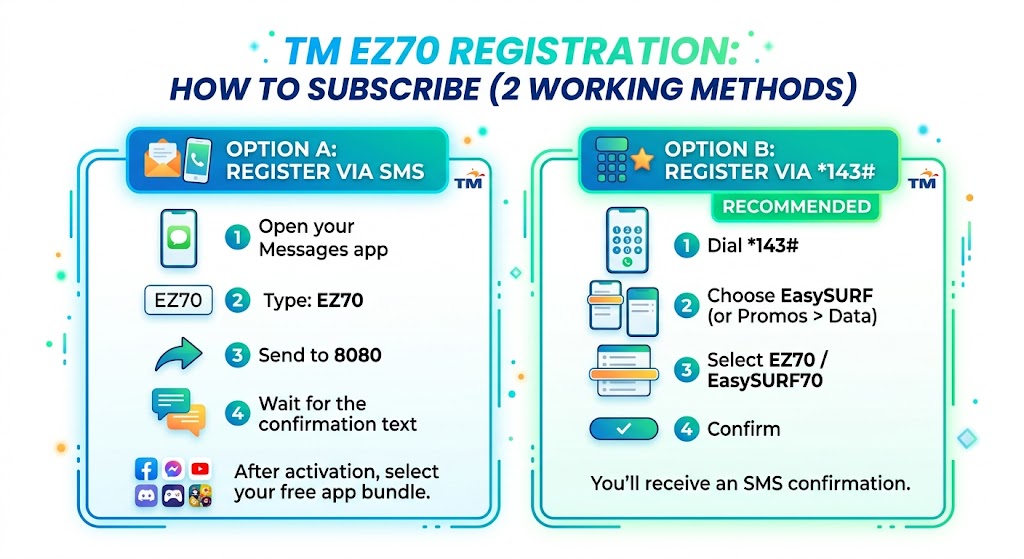
You can register via SMS, *143# menu, GlobeOne app, or GCash. I recommend *143# if SMS keywords change or you want to verify options directly from TM.
Option A: Register TM EZ70 via SMS
- Open your Messages app.
- Type: EZ70.
- Send to 8080.
- Wait for the confirmation text.
After activation, TM will usually prompt you to select your free app bundle (instructions below).
Option B: Register TM EZ70 via *143# USSD
- Dial *143#.
- Choose EasySURF (or Promos > Data depending on your menu).
- Select EZ70 / EasySURF70.
- Confirm.
You'll receive an SMS confirmation once successful.
Option C: Register TM EZ70 via the GlobeOne App
- Download and open GlobeOne (formerly TM App).
- Log in with your TM number.
- Go to Shop or Promos.
- Find EasySURF70 and tap Subscribe.
Convenient if you prefer a visual interface and want to see all available promos before choosing.
Option D: Register TM EZ70 via GCash
- Open GCash and go to Load (or Buy Load).
- Enter your TM number.
- Browse the promos list and select EZ70 or EasySURF70.
- Pay and confirm.
Useful if you have GCash balance but no regular load on your TM SIM.
How to Choose and Claim Your Free EZ70 App Bundle (1 GB per day)
After you register EZ70, you must choose one bundle. This is important because that 1 GB/day is where most of the value is.
EZ70 App Bundle Options and Activation Keywords
| Bundle | Included Apps | How to Activate |
|---|---|---|
| FunALIW (Entertainment) | Facebook, YouTube, Mobile Legends, Wild Rift, TikTok, WeSing | Text EZ70 FNA to 8080 |
| FunLARO (Gaming) | Mobile Legends, Wild Rift, Call of Duty, Clash Royale | Text EZ70 FLR to 8080 |
| FunKDRAMA (Entertainment) | YouTube, Netflix, iflix, Viu, V LIVE | Text EZ70 FKD to 8080 |
| FunKWENTUHAN (Social & Chat) | Facebook, Instagram, Viber, WhatsApp, Google Meet, Zoom, WeChat | Text EZ70 FNK to 8080 |
| FunRAKET (Shopping & Payments) | Shopee, Lazada, GCash, Grab | Text EZ70 FNR to 8080 |
| FunARAL (Learning & Work) | Google Suite, Zoom, Google Meet, MS Teams, YouTube Learning, DepEd Commons, TESDA | Text EZ70 FNL to 8080 |
| Watch and Play (Video + Gaming) | YouTube, Netflix, NBA, Viu, iflix, HBO GO, Mobile Legends, Wild Rift, CODM, PUBG | Text EZ70 WP to 8080 |
Important reminders so you don't get surprised:
- You can typically choose only one bundle per registration. Some users report being able to re-send a different bundle keyword later in the 7-day window — test this on your own account.
- The 1 GB/day allocation usually refreshes daily; unused daily data often does not roll over (this behavior can vary, so check your status message).
- App lists can be updated by TM; if an app isn't counting correctly, confirm your bundle and check the latest menu on *143#.
How to Check Your TM EZ70 Data Balance (Open Access, Bundle, Validity)
Don't guess your remaining data. Check it, especially if you're doing classes, meetings, or gaming sessions.
Balance check via SMS
| What you're checking | Keyword | Send to |
|---|---|---|
| Promo status, remaining data, validity | EZ STATUS | 8080 |
| Daily app bundle remaining | DATA BAL | 8080 |
If SMS responses are delayed, wait a few minutes and retry. Network congestion happens, especially during peak hours.
How to Use the 1 GB GoWiFi Freebie (Practical Steps)
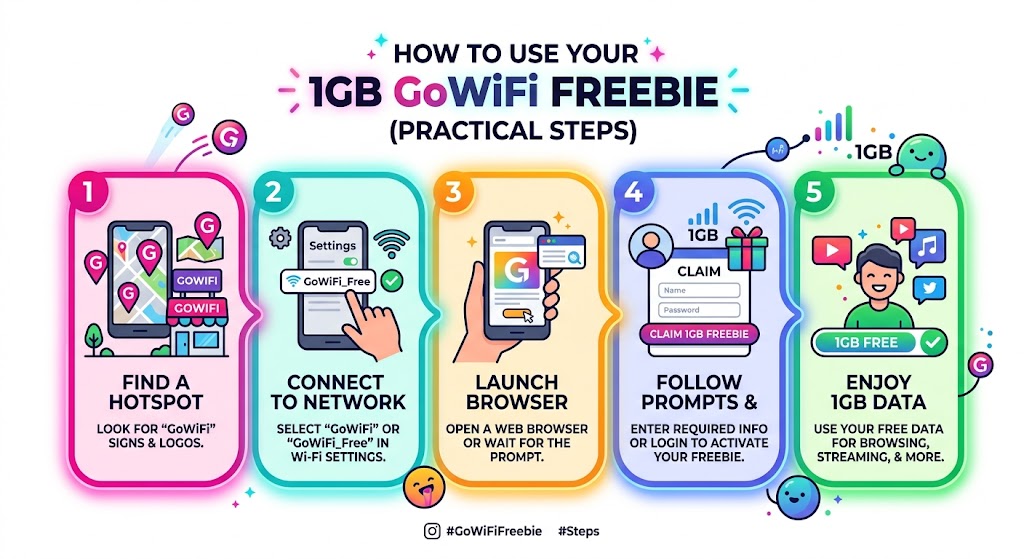
The GoWiFi inclusion is underrated. When you're near a hotspot, that 1 GB can feel faster and more stable than mobile data.
Typical way to connect (may vary by hotspot)
- Turn on WiFi and connect to a GoWiFi network (often labeled GoWiFi).
- Open your browser; you should be redirected to a login portal.
- Choose TM or Globe login option.
- Enter your number and confirm via OTP (if prompted).
- Your GoWiFi data will be used until it runs out.
Tip: If the portal doesn't appear, turn WiFi off/on, forget the network, reconnect, then open a browser and type any site (example.com) to force redirect.
EZ70 Cost Breakdown and Value (So You Can Compare Promos)
Even if you don't care about "pesos per GB," this helps you see if EZ70 matches your usage.
Value estimate
| Basis | Computation | Notes |
|---|---|---|
| Total possible data | Up to 9 GB | ₱70 / 9 GB ≈ ₱7.78 per GB |
| Best for | Bundle-heavy usage | Higher value if your daily apps match your bundle. |
| Less ideal for | Pure open-access use | Open access is only 1 GB total. |
Real talk: The per-GB cost is great if you maximize your bundle daily. But if you mostly browse random sites or download files, 1 GB open access won't last. In that case, consider EZ99 or a different promo with more open-access data.
Realistic Data Usage Guide (So You Pick the Right Bundle)
Here are practical, real-world estimates (varies by quality settings, device, and app updates):
| Activity | Estimated Data per Hour |
|---|---|
| Facebook scrolling (mostly text/photos) | 60 to 150 MB per hour |
| TikTok/Reels short videos | 300 to 900 MB per hour |
| YouTube 480p | 250 to 400 MB per hour |
| YouTube 720p | 700 MB to 1.3 GB per hour |
| Zoom call (standard quality) | 540 MB to 1.2 GB per hour |
| Mobile Legends | 15 to 40 MB per match (plus updates) |
| Spotify music | 40 to 150 MB per hour (depends on quality) |
If you do Zoom daily, FunARAL usually makes more sense than social bundles.
How to Extend TM EZ70 (Add 1 More Day)
If you want to stretch it without buying a bigger promo, extension is an option.
Try FREE EXTEND first: Some EasySURF subscriptions support a one-time free extension. Text FREE EXTEND to 8080 before paying ₱5 — if it works, you save the load.
Paid extend steps (₱5)
- Make sure you have at least ₱5 load.
- Open Messages.
- Type: EZ EXTEND.
- Send to 8080.
- Wait for confirmation.
Once confirmed, your EZ70 validity is extended by one day (in many cases with the same bundle setup, but always verify via EZ STATUS after extending).
How to Stop or Unsubscribe from TM EZ70
If you're switching promos (or something stacked incorrectly), you can stop the subscription.
Unsubscribe via SMS
- Open Messages.
- Type: EZ STOP.
- Send to 8080.
- Wait for the confirmation text.
Alternative: stop via *143#
- Dial *143#.
- Go to My Account.
- Choose Subscriptions.
- Select the active promo.
- Choose Stop.
TM EZ70 Add-ons and Data Boosters (When You Run Out)
If your data runs out early, boosters can help you finish the week without changing your main promo.
Common boosters used with EasySURF / EZ70
| Booster | Data | Validity | How to Activate |
|---|---|---|---|
| SurfBOOST15 | 1 GB open access | 1 day | Text SurfBOOST15 to 8080 |
| EASYWATCH19 | 1 GB for video apps (bundle-type) | Usually 1 day | Text EASYWATCH19 to 8080 |
| Midnight Surf10 | 1 GB (12:00 AM to 6:00 AM) | Same night window | Text MID10 to 8080 |
Availability can vary per account and season. If an add-on fails, check *143# for the current booster list.
EZ70 vs Other TM Promos (Quick Comparison)
If you're deciding between weekly options, here's an easy comparison.
| Promo | Price | Validity | Best for |
|---|---|---|---|
| EZ70 | ₱70 | 7 days | Balanced weekly use, app bundle daily + texts. |
| EZ50 | ₱50 | 3 days | More open-access data (3 GB), shorter validity. |
| EZ99 | ₱99 | 7 days (often) | More data allowance, heavier browsing/streaming. |
If you consistently run out of open-access data on EZ70, EZ99 is usually the cleaner upgrade than stacking boosters every time.
Troubleshooting (What to Do When EZ70 Doesn't Work)
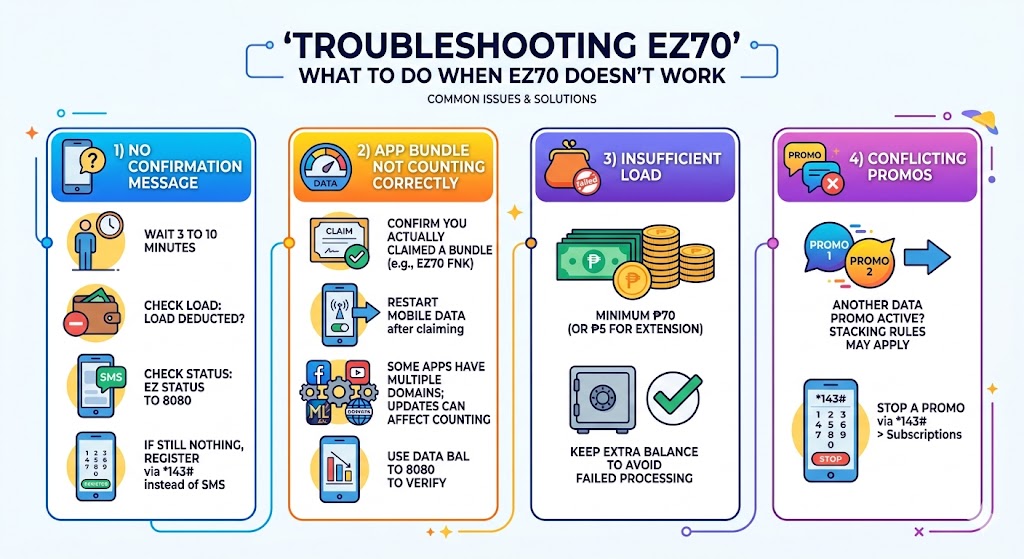
These are the most common issues I see readers run into:
1) No confirmation message after registering
- Wait 3 to 10 minutes.
- Check if your load was deducted.
- Try checking status: EZ STATUS to 8080.
- If still nothing, register via *143# instead of SMS.
2) App bundle not counting correctly
- Confirm you actually claimed a bundle (example: EZ70 FNK).
- Restart mobile data after claiming.
- Some apps have multiple domains; updates can affect counting.
- Use DATA BAL to 8080 to verify the bucket decreasing.
3) Insufficient load
- Make sure you have at least ₱70 (or ₱5 for extension).
- Keep a small extra balance to avoid failed processing.
4) Conflicting promos
- If you have another data promo active, stacking rules may apply.
- Stop a promo via *143# > Subscriptions if needed.
Still stuck? Dial 808 from your TM SIM for free to reach TM customer service. They can check your account status and resolve subscription issues directly.
Frequently Asked Questions
How long is TM EZ70 valid?
7 days from activation. You can extend it by 1 day by texting EZ EXTEND to 8080 (requires ₱5), then confirm via EZ STATUS.
How do I register TM EZ70 again?
Once expired, you can re-register through EZ70 to 8080 or *143#.
Can I use TM EZ70 for online classes or Zoom?
Yes, especially if you pick FunARAL (Learning and Work) which commonly includes Zoom and productivity tools. If you'll do long calls daily, monitor usage because video calls can consume close to 1 GB per hour depending on quality.
What exactly is included in TM EZ70?
Typically: 1 GB open access, 1 GB/day app bundle, 1 GB GoWiFi, and unlimited texts to all networks, all valid for 7 days.
How do I check my remaining EZ70 data?
Text EZ STATUS to 8080 for overall promo status and DATA BAL to 8080 for the daily app bundle balance.
What's the difference between EZ70 and EZ50?
The real trade-off is open access vs. duration. EZ50 gives you 3 GB open-access data + 1 GB/day app bundle for 3 days. EZ70 gives you only 1 GB open-access data + 1 GB/day app bundle for 7 days. So EZ50 actually has more open access, but EZ70 lasts longer and delivers more total bundle data over the week. Pick EZ50 if you browse a lot of random sites; pick EZ70 if you mainly use apps that fit a bundle and want a full week of coverage.
Conclusion: Is TM EZ70 Worth It in 2026?
If your goal is to stay connected for a full week on a tight budget, TM EZ70 is still one of the most practical weekly promos. You get a predictable daily app data allocation, a small open-access buffer, GoWiFi data for hotspots, and unlimited texts that help you stay reachable even when data is tight.
If you want to activate it now:
- Text EZ70 to 8080, or
- Dial *143# and find EasySURF > EZ70.