

Checking your TM balance regularly helps avoid dropped calls, stopped data, and failed promo renewals. Use the methods below to confirm regular load, promo status, remaining data, and validity.
Quick Cheat Sheet: Fastest Ways to Check TM Balance
| Need to check | Method | Internet needed? | Typical speed |
|---|---|---|---|
| Regular load balance | Text BAL to 2888 | No | 10–30 seconds |
| Regular load fallback | Text BAL to 214 or 8080 | No | 10–30 seconds |
| Regular load balance | Dial *143# or *2888# | No | 5–20 seconds |
| Voice balance prompt | Call 222 | No | 15–60 seconds |
| Feature phone menu | SIM Toolkit | No | Varies |
| Promo and data balance | GlobeOne app | Yes | Instant |
| Data balance | Text DATA BAL to 8080 | No | 10–30 seconds |
Short codes and menu paths can change. If one method fails, try GlobeOne or another method in this guide. GlobeOne balance checking is free, but it requires internet access.
How to Check TM Load Balance
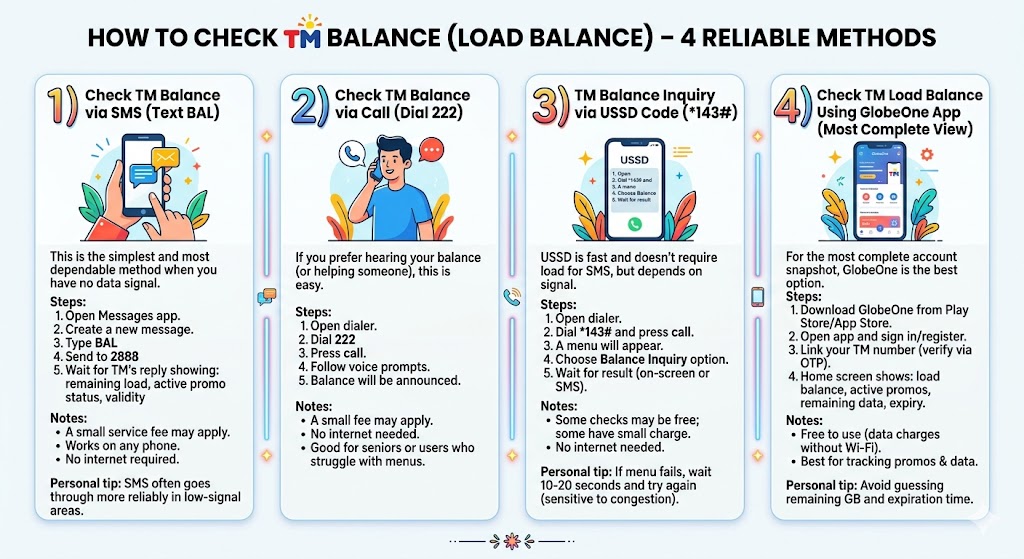
1) SMS: Text BAL to 2888
- Open Messages.
- Type BAL.
- Send to 2888.
- If there is no reply, try sending BAL to 214 or 8080 as fallback options.
- Wait for the reply showing remaining load and sometimes promo validity.
SMS and USSD balance checks are usually free, but a small fee such as ₱1 may rarely apply depending on the current TM policy.
2) Call 222
- Open your dialer.
- Dial 222.
- Follow the voice prompts.
- Listen to your balance announcement.
3) Dial *143# or *2888#
- Dial *143#.
- Choose Balance Inquiry, My Account, or Check Balance.
- You can also try *2888# if you want balance details sent by SMS.
- Wait for the on-screen result or SMS confirmation.
4) GlobeOne App
- Open GlobeOne and sign in.
- Link your TM number via OTP if needed.
- Check the home screen for load, active promos, data and expiry.
GlobeOne balance checking is free, but you need internet or Wi-Fi to use the app.
5) SIM Toolkit
- Open the SIM Toolkit or SIM Services app on your phone.
- Choose the TM or Globe menu.
- Look for Balance, Account, or Inquiry options.
- Wait for the menu result or SMS reply.
6) Timmy on Facebook Messenger
If you have Wi-Fi or Messenger access, you can chat with Timmy, TM’s Facebook Messenger chatbot, and follow the prompts to check account or balance details.
How to Check TM Data Balance
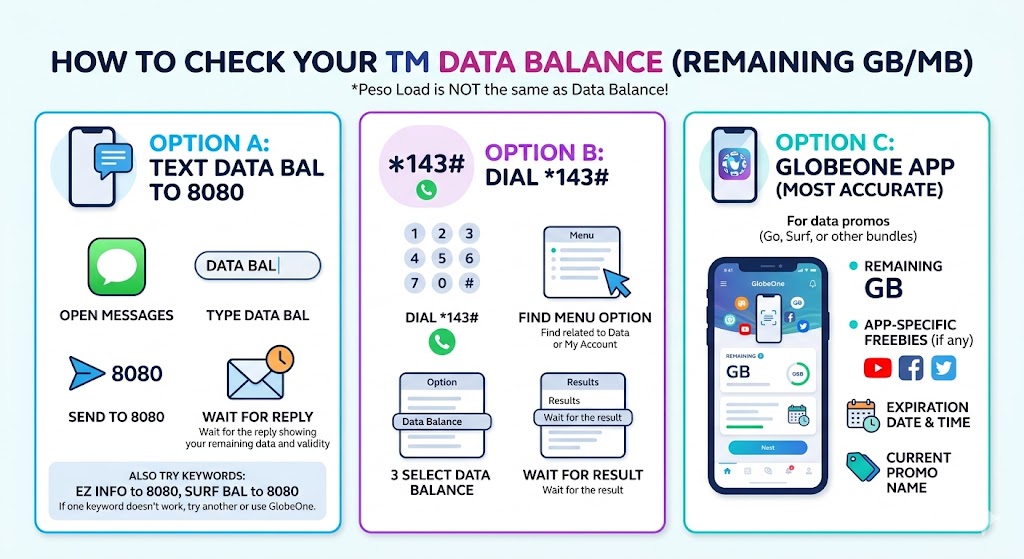
Load balance is peso credit. Data balance is remaining MB/GB from your active promo.
Text DATA BAL to 8080
- Open Messages.
- Type DATA BAL.
- Send to 8080.
- Wait for the reply showing remaining data and validity.
- DATA BAL to 8080: use this for general data balance.
- SURF BAL to 8080: use this for certain surf or EasySurf-style promos.
- EZ INFO to 8080: use this for more detailed active promo, data balance, and validity information.
Use *143# or GlobeOne
- Dial *143# and find the data or active promo option.
- Use GlobeOne for the cleanest promo name, remaining GB, app freebies and expiry display.
How to Check TM Balance Without Internet
- SMS: BAL to 2888, 214, or 8080
- USSD: dial *143# or *2888#
- Voice: call 222
- SIM Toolkit: open SIM Services and choose the balance/account option
- Data SMS: DATA BAL, SURF BAL, or EZ INFO to 8080
Common Problems and Fixes
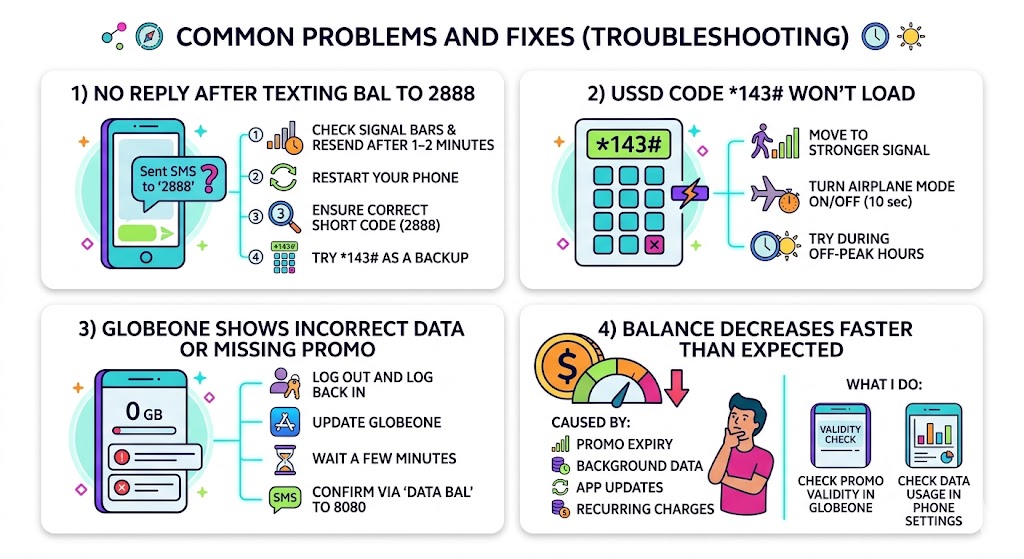
| Problem | Fix |
|---|---|
| No reply from 2888 | Check signal, resend after 1–2 minutes, restart phone, or try BAL to 214/8080, *143#, *2888#, or GlobeOne. |
| *143# shows connection problem | Move to stronger signal, toggle airplane mode, and try again later. |
| GlobeOne looks wrong | Update the app, log out/in, wait a few minutes after subscribing, or confirm via DATA BAL. |
| Balance drains fast | Check promo expiry, background data, app updates and recurring subscriptions. |
Best Method to Use
| No internet | Use BAL to 2888, 214, or 8080; dial *143#/*2888#; use SIM Toolkit; or call 222. |
|---|---|
| Have Wi-Fi or mobile data | Use GlobeOne for free balance checking, or Timmy on Facebook Messenger if available. |
| Want full promo details | Use GlobeOne or text EZ INFO to 8080. |
| Only data balance | Use DATA BAL or SURF BAL to 8080, or GlobeOne. |
FAQs
How can I check my TM balance?
Text BAL to 2888, 214, or 8080; dial *143# or *2888#; call 222; use SIM Toolkit; chat with Timmy; or use GlobeOne.
How do I check TM data balance?
Text DATA BAL to 8080, use SURF BAL or EZ INFO to 8080 for certain promos, check through *143#, or open GlobeOne.